AI Tutorials
Hermes Agent Tutorial: Complete Guide to the Persistent AI Agent
Install and master Hermes Agent: providers, tools, skills, memory, self-improvement, web dashboard, messaging gateway, cron, MCP, sandbox backends, and security.
Read MoreZharfAI Team
AI Development

OpenClaw is a self-hosted personal AI assistant that runs a Gateway on your own device or server and can connect models, files, browsers, apps, messaging channels, skills, plugins, nodes, and scheduled work. It is broader than a coding copilot: the same agent can answer in a local dashboard, receive a Telegram message, inspect a file, control a paired device, or run an automation—if you grant those capabilities.
That breadth is also the risk. OpenClaw’s official security documentation describes a single trusted operator boundary per Gateway; it is not a hostile multi-tenant isolation layer. This tutorial therefore treats setup, identity, network exposure, credentials, tool authority, and audit as first-class steps.
The guide was verified on August 6, 2026 against the official OpenClaw documentation and official repository. Commands and configuration evolve rapidly; check the live docs for your installed version.

Official project artwork from the OpenClaw repository.
Use OpenClaw when you want a persistent personal assistant across messaging, devices, browser actions, memory, and automation. Use OpenAI Codex, Claude Code, or OpenCode when the primary job is engineering inside a repository.
OpenClaw can still call coding tools, attach Claude Code, use a Codex App Server plugin, or operate on a development workspace. The distinction is architectural: OpenClaw is the long-lived assistant and Gateway; a coding agent is usually a repository-centered worker. Keep their credentials and authority separate unless the integration genuinely needs both.
A basic OpenClaw deployment has these layers:
Every arrow between those layers is a trust decision. A message from an approved user can still contain malicious web content. A trusted model can still make a destructive mistake. A legitimate plugin can still request excessive authority.
The current official quickstart requires a supported Node.js release and a model-provider credential. For macOS or Linux:
curl -fsSL https://openclaw.ai/install.sh | bash
For Windows PowerShell:
iwr -useb https://openclaw.ai/install.ps1 | iex
Inspect remote install scripts before executing them, particularly on a machine with personal files or credentials. After installation, run the guided setup:
openclaw onboard --install-daemon
The wizard detects available AI access, verifies it with a real completion, and helps configure the workspace, Gateway, and optional features. Use the classic wizard only when you need its advanced provider, remote Gateway, channel, daemon, skill, or import controls:
openclaw onboard --classic
Verify the control plane:
openclaw gateway status
openclaw health
openclaw dashboard
The default local Gateway port in the current quickstart is 18789. Do not expose it publicly merely because the dashboard loads on localhost.
Skip optional channels, plugins, browser control, device nodes, and automation during the first pass. Establish one model, one local workspace, and a local Control UI conversation. Then add capabilities one at a time and run the security audit after every meaningful boundary change.
A good first request is read-only and local:
Summarize the files in this workspace. Do not run commands, open a browser,
send messages, modify files, or create scheduled work.
Confirm the actual tool events and output. A friendly reply is not evidence that unnecessary tools were unavailable.
The official security guide recommends:
openclaw security audit
openclaw security audit --deep
openclaw security audit --json
--deep adds live Gateway probes and deeper plugin or skill checks. Review findings before using --fix; automated remediation is intentionally narrow and cannot decide your trust model for you.
The highest-priority findings are:
OpenClaw is not designed to put mutually untrusted people behind one shared agent. For separate families, teams, clients, or tenants, use separate Gateways and credentials—preferably separate OS users, containers, or hosts.
OpenClaw can keep the Gateway on the host while running tools in Docker or another supported sandbox backend. Current workspace access modes include:
none: the sandbox receives its own workspace and cannot access the agent workspace;ro: the agent workspace is mounted read-only;rw: the agent workspace is mounted read/write.Start with none or ro for agents that consume untrusted messages. Use a per-agent or per-session sandbox scope when agents must not see each other’s state. A sandbox reduces filesystem and process blast radius, but it does not make arbitrary credentials, browser sessions, or external APIs safe.
Avoid the global elevated-tool escape hatch for public or group-facing agents. If one workflow requires host access, isolate it as a separate agent with a narrow sender allowlist, tool policy, and workspace.
The macOS app may request Automation, Notifications, Accessibility, Screen Recording, Microphone, Speech Recognition, Camera, or Location access depending on enabled features.
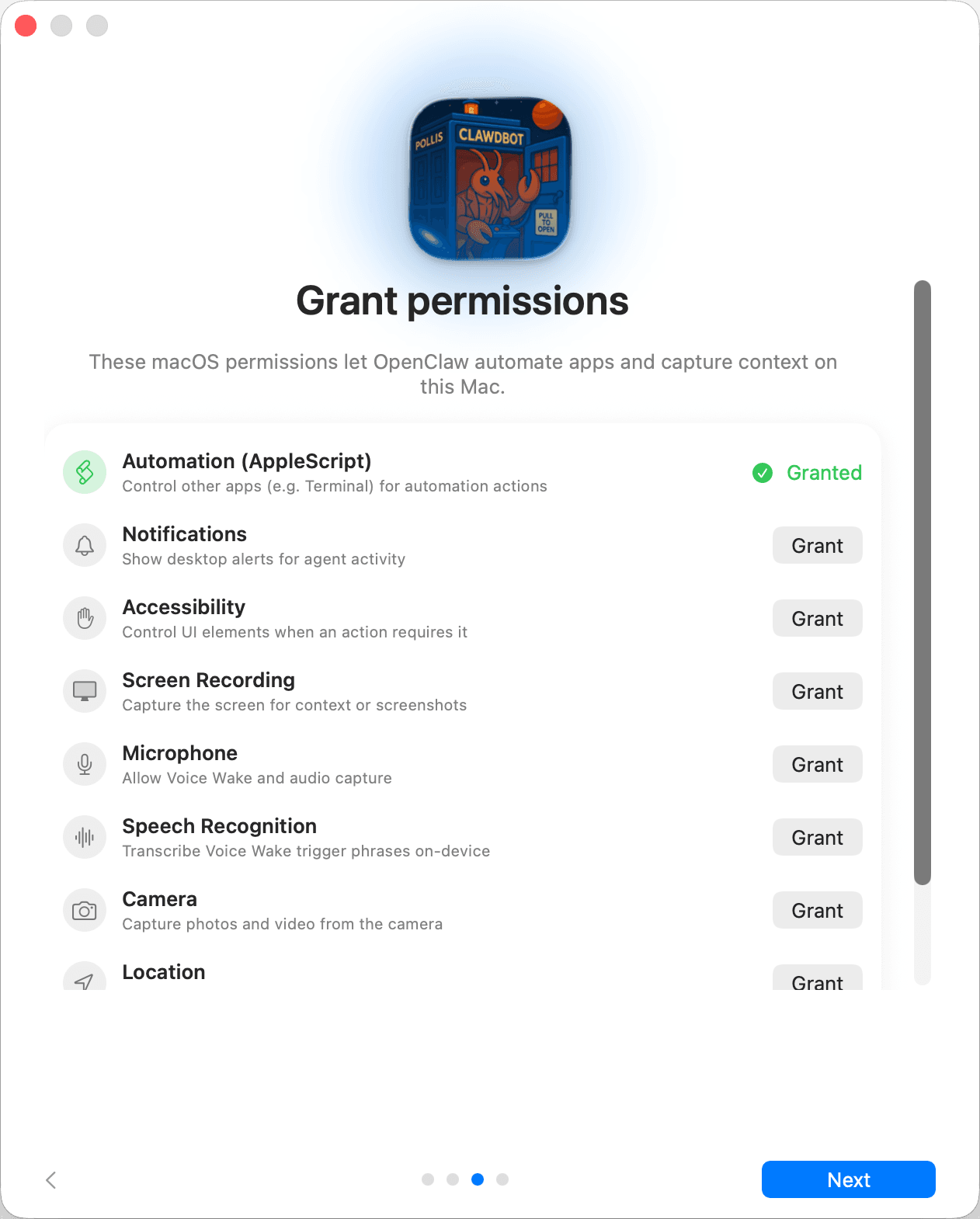
Official screenshot from OpenClaw’s macOS onboarding documentation.
Do not press “Grant” down the list. Enable only the capability required by a tested workflow. Accessibility and Screen Recording can expose far more than a chat bot needs; Camera, Microphone, and Location carry separate privacy implications. macOS permission prompts are an OS boundary, not proof that the agent will use the data appropriately.
OpenClaw automatically injects a set of workspace files, including AGENTS.md, SOUL.md, TOOLS.md, IDENTITY.md, USER.md, HEARTBEAT.md, BOOTSTRAP.md, and MEMORY.md when present. Give each file a distinct purpose:
AGENTS.md: operating rules, standing orders, approval gates, and escalation conditions;SOUL.md: tone and persona, never a substitute for authorization;TOOLS.md: local tool notes and safe usage conventions;IDENTITY.md: the agent’s declared identity and role;USER.md: compact user preferences that are appropriate to retain;HEARTBEAT.md: checklist for periodic awareness;MEMORY.md: durable, curated facts—not a transcript dump;BOOTSTRAP.md: initial setup context.Never place secrets, recovery codes, private keys, or sensitive personal records in these files. A file loaded every session expands both context exposure and the damage from a compromised session.
Standing orders are persistent programs, commonly stored in AGENTS.md. A safe standing order names scope, trigger, approval gates, escalation, verification, and prohibited actions:
## Program: Weekly repository health report

Authority: read repository status and CI results; write a draft report locally.
Trigger: every Friday at 09:00 Asia/Tehran.
Approval gate: do not post, email, open issues, push, merge, or deploy.
Escalate: missing access, failed CI, suspected secret, or ambiguous repository.

Steps:
1. Fetch read-only evidence from approved sources.
2. Compare against the previous report.
3. Write `Reports/weekly/YYYY-MM-DD.md`.
4. Verify the file and source links.
5. Notify the owner that a draft is ready for review.
Standing orders describe what is authorized. Cron defines when it runs. The underlying tool policy must still enforce the boundary; prose alone cannot stop a dangerous call.
Configure one channel at a time through the official channel guide or wizard. Verify the exact bot account, destination, and supported actions. For direct messages, use pairing or explicit sender allowlists. For groups, require deliberate activation and avoid granting every participant the agent’s full tool authority.
Unknown senders should be ignored or paired—not accepted globally. OpenClaw’s current pairing model lets the owner approve a code from the CLI. After setup, test:
Do not put one tool-enabled agent in a public room and assume its personality file will resist prompt injection.
Use the model commands and provider wizard documented for your release:
openclaw models status
openclaw models list
openclaw models configure
Select models based on tool reliability, context, latency, cost, and instruction robustness—not brand alone. A fallback may have different safety behavior and tool-call quality. Evaluate the entire fallback chain on the same dangerous and ordinary tasks.
Our current model guide covers the exact identifiers and caveats for qwen3.8-max-preview, glm-5.2, and deepseek-v4-flash. Configure one only when OpenClaw's live provider wizard or documentation supports its endpoint; a compatible API does not guarantee identical tool or thinking behavior.
Keep provider keys in supported secret stores or references. Avoid copying a key into openclaw.json, a workspace file, channel message, or screenshot. Run openclaw secrets audit where supported and rotate any secret exposed to a transcript.
Skills teach procedures; plugins can add executable tools, hooks, providers, channels, or integrations. ClawHub helps discover and install packages, but marketplace presence is not a guarantee of safety.
Before installation:
Use current commands such as these only after checking --help:
openclaw skills search <term>
openclaw skills info <name>
openclaw plugins list
openclaw plugins doctor
Treat automatic skill updates as code updates. Pin critical workflows and re-review material changes.
Browser control can read authenticated pages, submit forms, download files, and trigger side effects. Paired nodes can expose screen, camera, location, notifications, or system execution depending on platform and policy. These are operator-level capabilities.
Use a dedicated browser profile with minimal accounts, no password-manager autofill, and explicit download handling. Keep remote debugging and node control on authenticated private networks. Pair devices deliberately, rotate or revoke tokens when lost, and disable actions the agent does not need.
Require confirmation immediately before purchases, posts, messages, account changes, destructive file actions, financial operations, or disclosure of personal data. A prior request to “help with this website” is not standing authorization for every click.
OpenClaw has several automation mechanisms:
Use cron for exact timing, heartbeat for a small batched awareness checklist, hooks for deterministic events, and Task Flow only when a multi-step process needs inspection and recovery. Every automated path needs a bounded credential, timeout, retry limit, output destination, failure notification, audit trail, and kill switch.
Headless automation cannot ask a human at every step. Configure it to fail closed on new approval requirements instead of silently broadening authority.
Subagents can isolate research or run work in parallel, but each child inherits or receives tools, models, memory, and sandbox decisions. Restrict the allowed agent IDs and deny session-spawn tools for agents that do not need delegation. For workflows that must remain isolated, require a sandbox for the child instead of merely inheriting a possibly unsafe parent state.
Use delegation for independent, read-heavy jobs and consolidate summaries in the parent. Avoid spawning public-facing agents with broad messaging or shell tools.
Before upgrades or major configuration changes:
openclaw backup
openclaw status
openclaw doctor
Inspect what the backup contains and protect it like the live state; it may include identity, sessions, configuration, or tokens. Test restoration on an isolated installation. Update through the supported channel, read release notes, restart the Gateway, verify channels and automations, and rerun the security audit.
Do not treat openclaw reset or uninstall as a casual troubleshooting step. Confirm the exact state that will be removed and whether it can be recovered.
Dashboard does not open: check openclaw gateway status, openclaw health, and openclaw logs; verify the port is not bound by another process.
A channel receives messages but does not reply: verify channel status, sender allowlist or pairing, routing, model health, and dead-letter or channel logs.
The agent cannot access a workspace: inspect the effective sandbox scope and workspaceAccess; do not disable the sandbox globally just to fix one path.
Automation did not run: distinguish scheduler configuration from task records. Inspect cron, tasks, timezone, timeout, delivery target, and headless approval behavior.
Security audit reports an open Gateway: bind to localhost or a private authenticated interface, set strong Gateway authentication, and avoid public tunnels unless the official exposure runbook is satisfied.
The agent keeps retrying a blocked action: stop the task, keep the deny rule, and correct the workflow. Do not reward repeated failure with broader permissions.
It can work with code and integrate coding agents, but its primary architecture is a persistent personal assistant and Gateway across tools, devices, messaging, and automation.
Yes, the Gateway and tools can run on your own device or server. Model inference and connected services may still be remote.
The official security model is one trusted operator boundary per Gateway. Mutually untrusted users or tenants need separate Gateways and ideally separate OS or host boundaries.
No. You also need sender authorization, narrow tools, credential isolation, network controls, safe channels, reviewed plugins, and monitoring. Some capabilities, such as messaging or browser accounts, create side effects outside the filesystem sandbox.
Begin with draft-only, low-risk work after the interactive flow is reliable. Add scheduling only after tool policy, verification, failure handling, and audit are proven.
Reviewed on August 6, 2026:
Install and master Hermes Agent: providers, tools, skills, memory, self-improvement, web dashboard, messaging gateway, cron, MCP, sandbox backends, and security.
Read More
Master GitHub Copilot CLI from installation and permissions to plan and autopilot modes, fleet agents, skills, MCP, plugins, IDE and remote work, review, hooks, and automation.
Read More
Master Google Antigravity CLI from installation and workspace trust to artifacts, subagents, models, permissions, sandboxing, skills, plugins, MCP, hooks, and headless automation.
Read MoreGet in touch with our team to discuss how we can help your business.